
Using an older SDK version?If you’re upgrading from SDK v2.x, check our Migration Guide for breaking changes and upgrade instructions.
Background
Get set up with the Helium SDK for iOS. Reach out over your Helium slack channel or email founders@tryhelium.com for any questions.Installation
Helium requires a minimum deployment target of iOS 15 and Xcode 14+. (Latest Xcode is recommended.)
- Swift Package Manager (SPM)
- Cocoapod
-
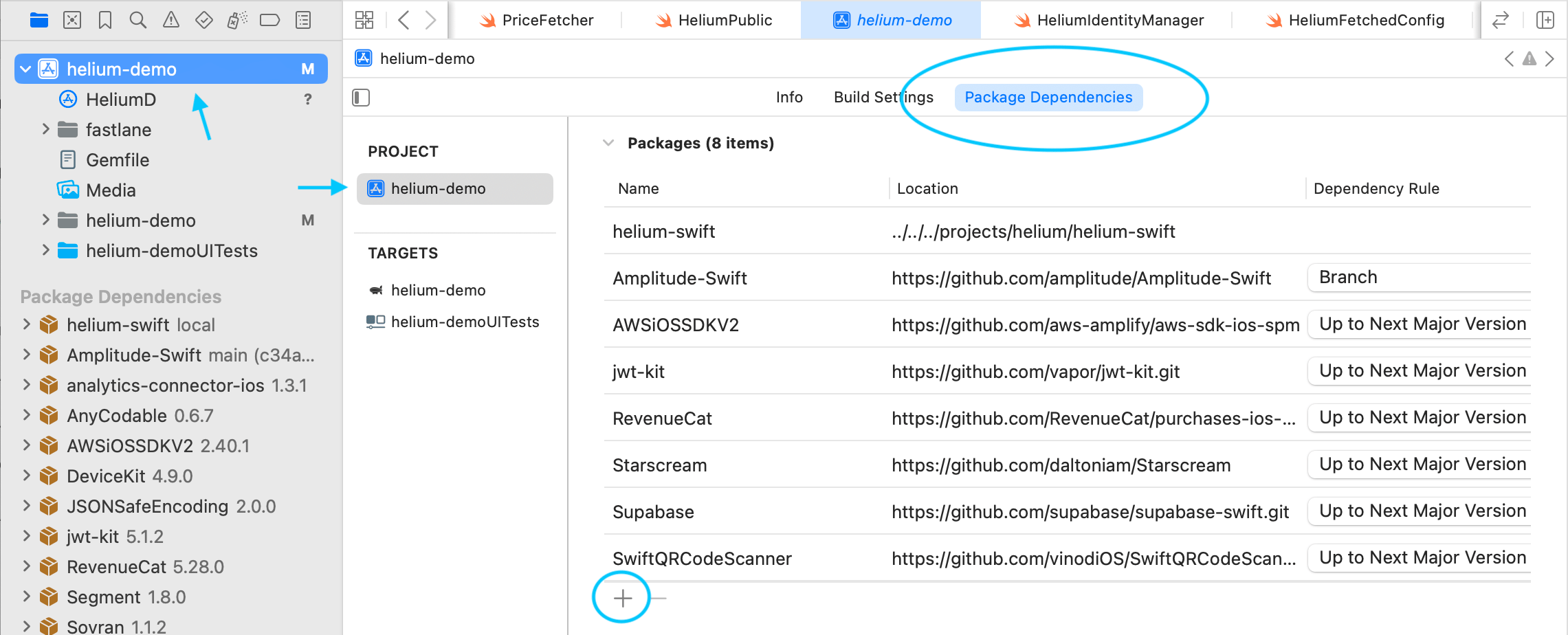
In Xcode, navigate to your project’s Package Dependencies:
-
Click the + button and search for the Helium package URL:
- Click Add Package.
-
In the dialog that appears, make sure to add the Helium product to your app’s main target:
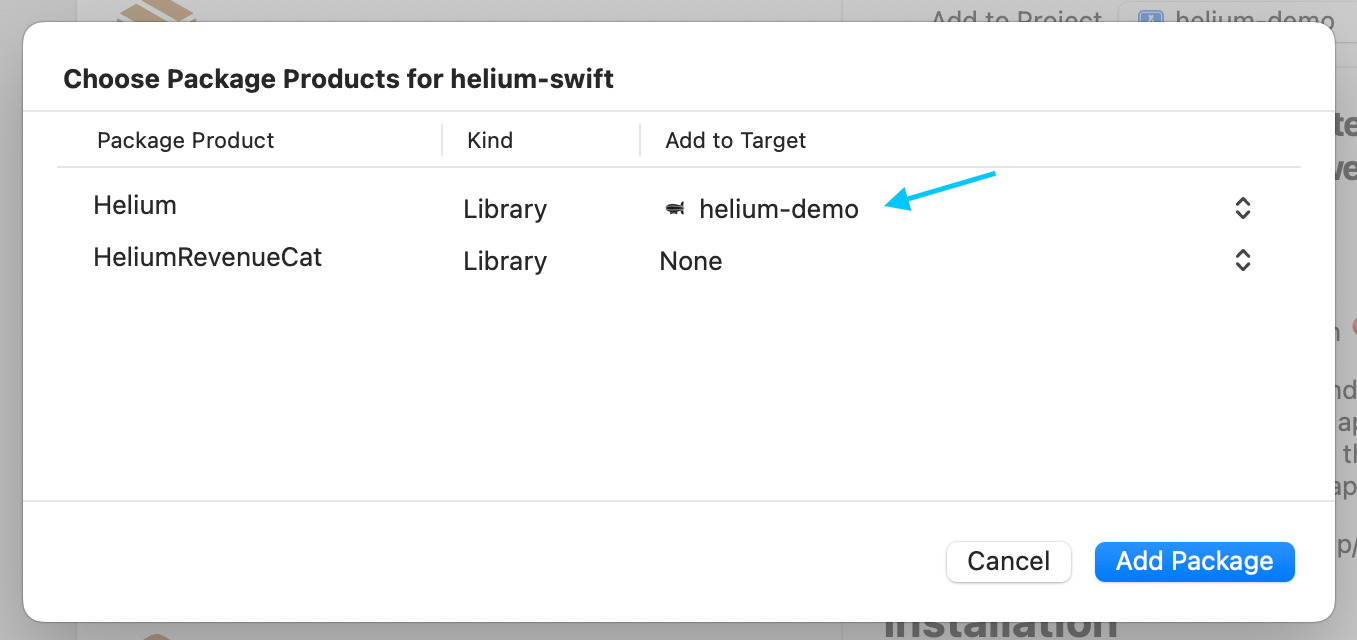
- (Optional) If you are using RevenueCat to manage purchases, we recommended you also add HeliumRevenueCat to your target so that you can use our RevenueCatDelegate referenced in the HeliumPaywallDelegate section of this guide. Otherwise leave as None for the HeliumRevenueCat row.
- Select Add Package in the dialog and Helium should now be ready for import.
-
Version: We recommend using an upToNextMajor rule to make sure you get non-breaking bug fixes. The latest stable version of helium-swift is 3.0.5 :

Initialize Helium
Initialize the Helium SDK as early as possible in your app’s lifecycle. Choose the appropriate location based on your app’s architecture:- SwiftUI
- SceneDelegate
- AppDelegate
Helium’s initialization is ran on a background thread, so you don’t have to worry about it blocking your app’s launch time. Helium will automatically retry downloads as needed for up to 90 seconds.
Custom User ID and Custom User Traits
Custom User ID and Custom User Traits
You can provide a custom user ID and custom user traits in the
initialize method or by using Helium.shared.overrideUserId. Ideally this will be called before initialize is called to ensure consistency in analytics events.Checking Download Status
Checking Download Status
You can check the status of the paywall configuration download using the You can also simply check if paywalls have been successfully downloaded with
Helium.shared.getDownloadStatus() method. This method returns a value of type HeliumFetchedConfigStatus, which is defined as follows:Helium.shared.paywallsLoaded().Get Paywall Info By Trigger
Get Paywall Info By Trigger
Retrieve basic information about the paywall ready to show for a specific trigger
with
Helium.shared.getPaywallInfo(trigger: String) which returns:HeliumPaywallDelegate
TheHeliumPaywallDelegate can be passed in to Helium.shared.initialize otherwise the default StoreKitDelegate will be used. This delegate is responsible for handling the purchase logic for your paywalls and handling Helium Events.
Use one of our pre-built delegates or create a custom subclass of HeliumPaywallDelegate.
- StoreKitDelegate
- RevenueCatDelegate
- Custom Delegate
Use the StoreKitDelegate to handle purchases using native StoreKit 2:To handle Helium Events, simply create a subclass of StoreKitDelegate and override
onPaywallEvent:If you subclass
StoreKitDelegate, make sure to pass in to Helium.shared.initialize!Presenting Paywalls
You must have a trigger and workflow configured in the dashboard in order to show a paywall.
Show it as a full screen modal (recommended)
CallHelium.shared.presentUpsell(trigger:) when you want to show the paywall. For example:
Attach it to a SwiftUI view as a ViewModifier
You can use the.triggerUpsell view modifier from any SwiftUI view:
Explicitly embed the Helium Paywall View
You can also explicitly get the Helium paywall view viaHelium.shared.upsellViewForTrigger. This method takes a trigger and returns the paywall as an AnyView.
You’ll need to handle presentation and dismissal yourself if you use this way of displaying paywalls. You can handle dismissal with PaywallEventHandlers.
PaywallEventHandlers
When displaying a paywall you can pass in event handlers to listen for relevant Helium Events. You can chain a subset of handlers with builder syntax:onOpen, onClose, onDismiss, and `onPurchaseSucceeded events can be specified this way. For others, see the section on HeliumPaywallDelegate.
Event Timing:
onDismissis triggered only when a user manually dismisses a paywall (from an X button, “no thanks”, etc.)onCloseis triggered both when the paywall is manually dismissed OR when a successful purchase triggers closing the paywall. (So any time the paywall is removed.)onPurchaseSucceededis triggered when a purchase completes successfully
- Use
onDismissfor post-paywall navigation when the paywall is dismissed but a user’s entitlement hasn’t changed - Use
onPurchaseSucceededfor your post purchase flow (e.g., a premium onboarding navigation) - Use
onClosewhen you need to handle logic when the paywall closed, regardless of reason
Checking Subscription Status & Entitlements
The Helium SDK provides methods to check user entitlements and subscription status. All entitlement checking methods areasync and should be called from within an async context.
The SDK automatically caches entitlement data and listens for transaction updates to keep information current.
Available Methods
hasAnyEntitlement()Determines if the user has purchased any non-consumable products or subscriptions.
hasAnyActiveSubscription(includeNonRenewing: Bool = true)Checks if the user has any active subscriptions. Set
includeNonRenewing to false to check only auto-renewing subscriptions.
hasEntitlementForPaywall(trigger: String, considerAssociatedSubscriptions: Bool = false)Checks if the user already has entitlements for products shown in a specific paywall trigger. Returns
nil if paywall configuration hasn’t been downloaded yet.
hasActiveEntitlementFor(productId: String)Checks if the user has entitlement to a specific product.
hasActiveSubscriptionFor(productId: String)Checks if the user has an active subscription for a specific product.
hasActiveSubscriptionFor(subscriptionGroupID: String)Checks if the user has an active subscription in a specific subscription group.
purchasedProductIds()Retrieves a list of all product IDs the user currently has access to.
activeSubscriptions()Returns detailed information about all active auto-renewing subscriptions.
subscriptionStatusFor(productId: String)Gets detailed subscription status for a specific product, including state information like subscribed, expired, or in grace period.
subscriptionStatusFor(subscriptionGroupID: String)Gets detailed subscription status for a specific subscription group.
Fallbacks and Loading Budgets
If a paywall has not completed downloading when you attempt to present it, a loading state can show. By default, Helium will show this loading state as needed (a shimmer view for up to 2 seconds). You can configure, turn off, or set trigger-specific loading budgets. If the budget expires before the paywall is ready, a fallback paywall will show if available otherwise the loading state will hide and a PaywallOpenFailed event will be dispatched. The iOS sdk has 3 options for fallbacks:- Fallback bundles
- Default fallback view
- Fallback view per trigger
HeliumFallbackConfig object passed in to initialize. Here are some examples: